
We had escaped the five circles of data hell.. I started hiring for our FP&A team. I imagined we would spend all day making recommendations and being in-country strategic CFOs to leadership across seven countries. But the thing was, as soon as we had the data, people wanted more, in the form of reports, drilldowns, emails, you name it. Management statements. By-country reports. Project subsets. Departments with costs allocated. Board and narrative decks.
More and more and more…
It was great progress, but then it felt like, for an entire year, all the FP&A team was doing was building reports. Customization added upon customization. We added departments, countries, thousands of team members, and countless new SKUs.
“Can we budget by approval?”
“Can I see every expense per approver and per person?”
Every report took:
Initial Excel report (note: it was all Excel at the time)
Creating back tabs that imported from the system
Cross-checking the reports so people could match numbers
Inevitably changing after a month to reflect a different org initiative
We didn’t have time to actually give advice…
It took a year to get this stabilized. For one year, we were writing reports, not strategy.
This is the second article in our series. Like the first, we’ll walk through the tactical steps we used to stabilize the FP&A team, followed by how today’s AI tools can achieve them now.
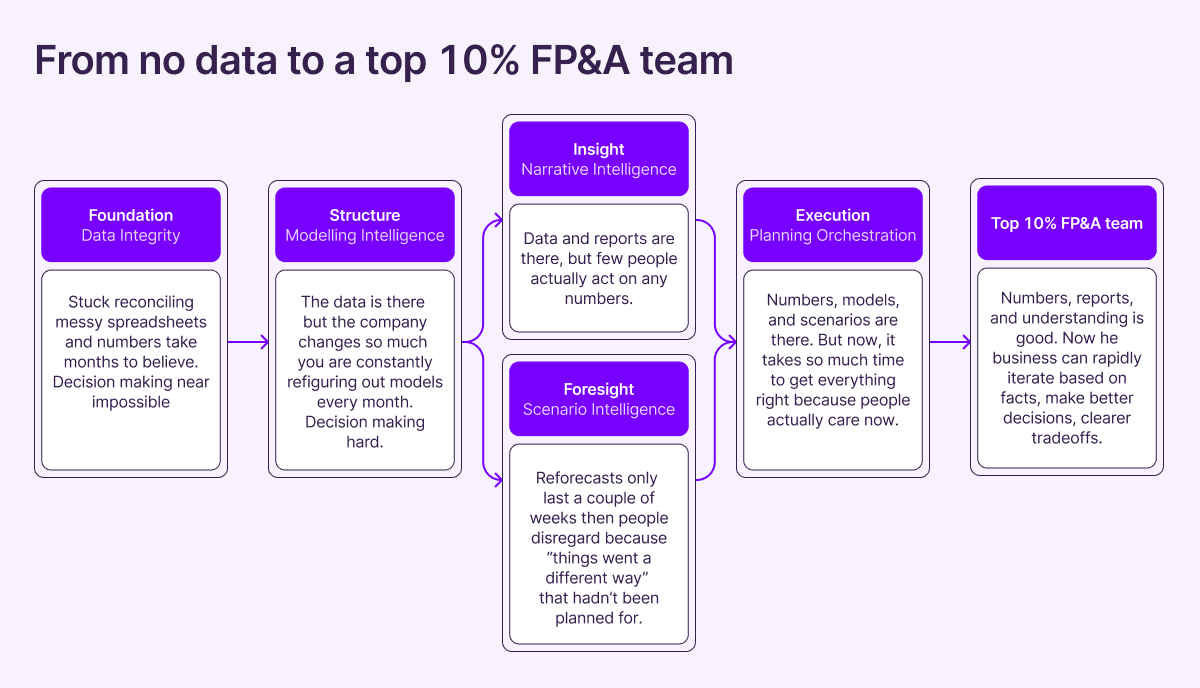
There are three things that make modeling an uphill climb at the start:
People often want dimensions that aren’t tracked.
Once you add additional values (new departments, regions, etc.), every report needs to be updated.
New activities that aren’t MECE. For example: you change the sales team structure or geography (e.g., moving from Northern/Southern Europe to Western/Eastern Europe), which creates three-way splits that don’t line up with what existed before.
Let’s get to work.
1. Mock up the reports before building
One of the reasons it was so complicated was that we had never had data before. So, when we started showing people the information, they became excited but didn’t exactly know what they wanted. People would ask for constant iterations, report tweaks, and restructures.
The fix was to mock up the reports first, before spending the time to link the right data. Then, we talked to department leads. Taking that feedback, we would return and reconcile the reports across dimensions. Sometimes, we had to push back, but this allowed us to prioritize which dimensions to add to the G/L.
AI Quick Win: You can build reports incredibly quickly with any AI tool by describing the report, asking for best-practice information to include, and creating a mock-up in Excel. It may not be perfect, but it quickly outlines what’s needed to tell the story.
Next Level AI: Build the reports in a system that does the data linkages for you.
2. Make every report a drill-down
The first reports we made actually caused us a tremendous amount of work. Because we used SUMIFS and formulas, it was very difficult to show the underlying transactions without having someone go to a back tab and filter information, which wasn’t very helpful. People would leave filters on, which caused a lot of questions, etc. We tried pivot tables, but honestly, people hated the way pivot tables looked, and it was hard to order them cleanly.
We never fully figured this out before transitioning to a modern reporting tool. But now, it’s easy. Nearly every tool worth its salt has immediate drill-downs on key numbers.
AI Quick Win: Upload the raw data from the report into a big LLM and start asking it the questions you’d normally ask when reviewing the report. It should be able to highlight key findings, outliers, etc.
AI Solution: Go beyond drill-downs. Include an AI box in the summary that provides an immediate explanation of the numbers (what moved, why it moved, and what transactions drove it).
3. Establish a company reporting overview
We created about 30 reports we deemed very important to key stakeholders. It was tough to see what had been updated, and whether there were any problems, until people told us, which wasn’t ideal. They would then mistrust the report going forward.
To solve this, we put links to the model all in one dashboard. Next to each link, we put a color indicating whether it was updated (based on whether key totals matched other totals). This gave us a strong overview of the entire business.
AI Quick Win: Open Claude (or a similar workspace tool) and point it to the directory with all your folders. Ask it to check that all reports match, and provide a short summary for each report with a direct link (if it’s in a file-sharing system). Then share it out.
AI Solution: Have AI constantly monitor your reports by giving it access to all data and having it update from your ERP. Put it on a schedule (Codex/Claude) to update the reports each period and give you a 360 view.
4. Assign a clear owner and give the right tools
After nine months, we were closer, but still not there. The finance team was getting pinged constantly about different reports. So, we made a pivotal shift: whoever stood to benefit the most became the report owner. This was never finance. It was the business owner.
They were responsible for what the report said (of course, any technical issues would be handled by finance). They would own the numbers, explain the report, and generally make it much better.
AI Quick Win: Walk through with the report owner how to upload it into AI and ask it questions. This can be game-changing.
AI Solution: Set up an agent to act as a business partner for each team. Load in previous reports. Maintain a simple instructions file with clear definitions. Or embed AI directly into your reporting environment so each person can ask questions in context.
In conclusion.
It took a year before we had a solid reporting setup to just tell the numbers. But once we did, we were able to start telling the stories that drove the company towards success.